by Jyotsna R
Hi MSPs,
As an administrator, you may create or update a configuration profile for one customer and need to apply the same profile to several other customer accounts. Updating each account individually can be time-consuming and may result in inconsistent configurations.
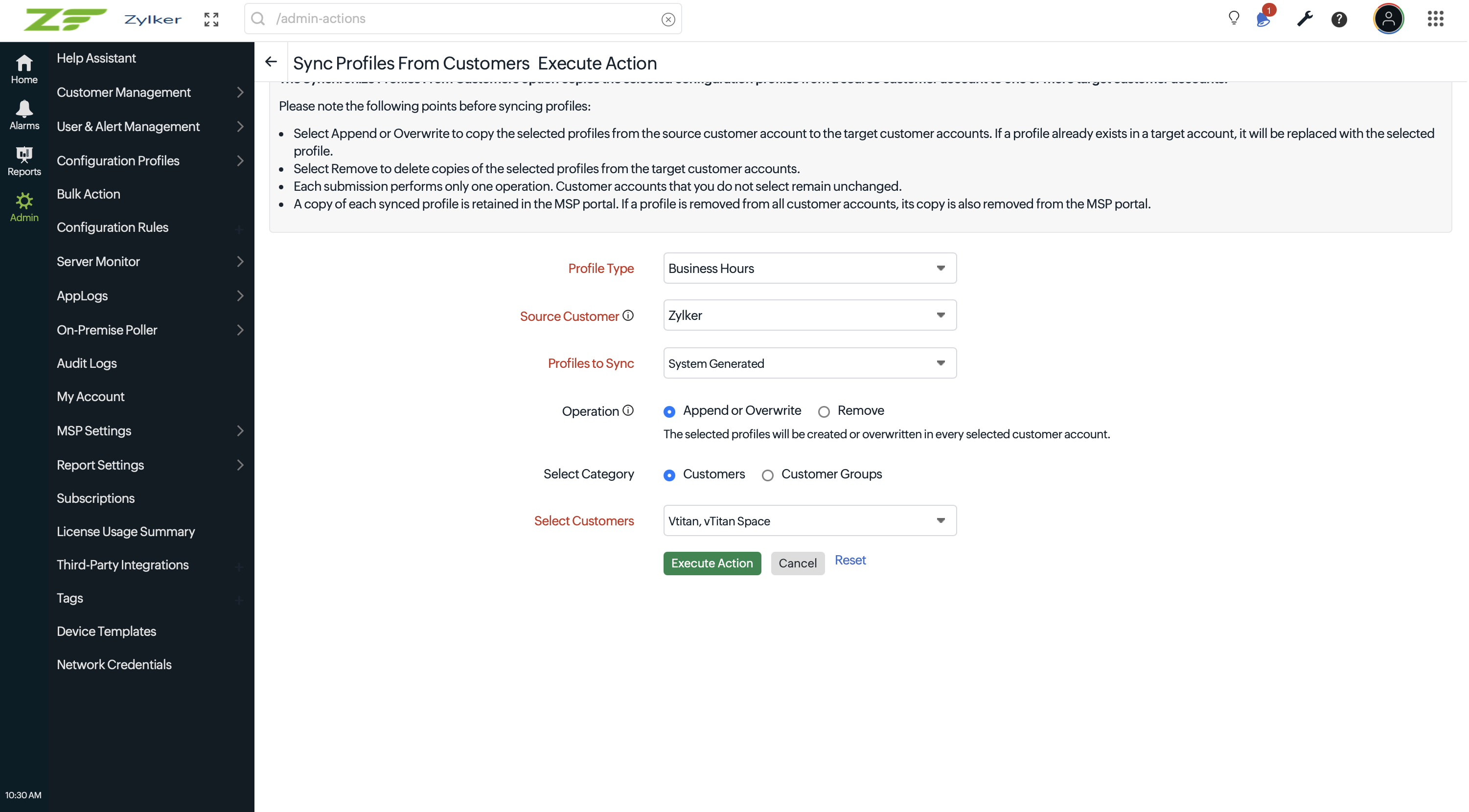
With the new Sync Profiles from Customer option under MSP Configuration Profiles, you can copy selected configuration profiles from a source customer account to multiple target customer accounts in a single action. You can also apply the action to customer groups or remove synchronized profile copies when they are no longer required.
Key benefits
- Maintain consistent configurations across customer accounts
- Reduce the time required to update profiles individually
- Synchronize profiles with selected customers or customer groups
- Append or overwrite existing profiles as required
- Remove synchronized profile copies from selected target accounts
How it works
- Go to Admin > Bulk Action
- Select Sync Profiles from Customer
- Select the profile type and source customer account
- Choose Append or Overwrite or Remove as the operation
- Select the target customers or customer groups
- Click Execute Action and confirm the operation
A copy of each synchronized profile is retained in the MSP portal. The copy is created during the first synchronization and updated whenever the source profile is synchronized again.
For more information, refer to our help documentation on Sync Profiles from Customer.
Best Regards,
The Site24x7 Team
Like (0)
Reply
Replies (0)