by Janani Sekar
Hi all,
When incidents occur, teams often have to switch between monitoring tools, status pages, and collaboration platforms just to understand what is happening and coordinate a response. This constant context switching can slow communication, delay decision-making, and increase the risk of missing critical updates.
Integrate StatusIQ with Zoho Cliq to receive real-time incident and maintenance updates directly in your team's Zoho Cliq channels. This integration prevents unnecessary switching between tools. You can also access status page updates and maintenance schedules on the go with the Zoho Cliq mobile app.
Use cases
- Simplify cross-team coordination with instant notifications: When a critical server goes down, multiple teams need to collaborate to resolve the issue. The DevOps team subscribed to infrastructure component updates receives an instant Zoho Cliq notification, and the on-call leader can post status updates to subscribers without opening the StatusIQ console.
- Prepare for maintenance with advance notifications: Customer-facing teams, such as support teams, need to stay informed about upcoming maintenance windows for critical components. Advance maintenance notifications help them prepare responses proactively before customer tickets start coming in.
- Optimize multi-account notifications for MSPs: MSPs managing multiple client accounts cannot afford mistakes when notifying the right teams about the right incidents. Using MSP Super Admin access, they can configure Zoho Cliq notifications for each business unit, ensuring that the relevant teams receive updates for the components they manage.
How can you receive your status page updates in Zoho Cliq?
Here is what you can do:
- If you are a StatusIQ Admin, Super Admin, or Spokesperson:
- Install the StatusIQ extension to your Zoho Cliq account.
- Select the option to send notifications about specific status page components via a Zoho Cliq channel.
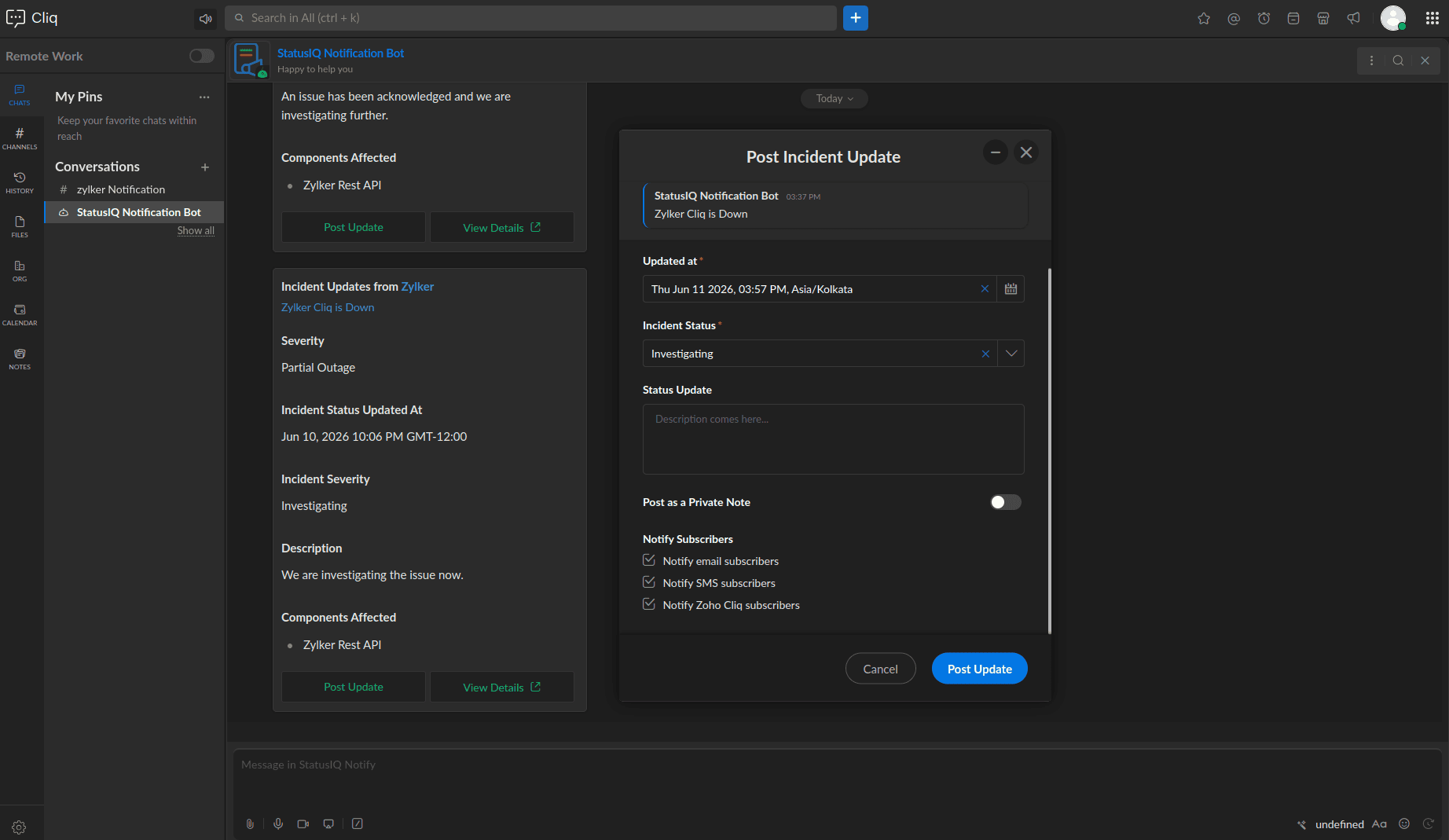
- Post incident updates directly to the status page from Zoho Cliq using the StatusIQ Notification Bot.
- If you are a user with a role other than those listed above, after the integration, you can:
- Get updates the moment something changes without missing alerts.
- Gain more clarity by directly navigating to your status page from your notification message in Zoho Cliq.
Get started
Keep your team informed during active incidents and improve maintenance communication. Start by:
Already using Zoho Cliq? You're one extension installation away from never missing a status update again.
Feel free to share your feedback in the comments. For further details, kindly contact our support team.
Regards,
The Site24x7 team
Like (0)
Reply
Replies (0)