Regardless of the type of app you are building, errors are inevitable, and thus, error handling is a core part of writing reliable software. In web apps built with Node.js, this becomes even more important. HTTP servers are long-running processes, and one bad request handler, one failed database call, one timeout, or one mistyped input can bring the entire service down if not caught properly.
Unlike strongly typed languages, JavaScript doesn’t catch many of these issues at compile time. Type checking is minimal unless you introduce TypeScript, so you're more likely to hit runtime errors if you're not careful.
This guide walks you through everything you need to know about error handling in Node.js: the different types of errors, multiple ways to handle them, how to create custom errors and exceptions, and some best practices for writing clean, fault-tolerant code.
Let’s start by looking at the main error handling techniques in Node.js.
This is the most direct way to handle errors in synchronous code or code using async/await.
Use try...catch when you’re dealing with potentially risky code that can throw, like JSON.parse, or any function that may throw a synchronous error. It also works with await, so it's useful in async functions too.
Example:
async function loadUser() {
  try {
  const user = await getUserFromDb();
    console.log(user.name);
  } catch (err) {
    console.error('Failed to load user:', err.message);
  }
}
It won’t catch errors in async callbacks, promises (unless used with await), or event handlers. Also, avoid wrapping large blocks of code; keep it focused so you can be specific about what failed.
This is the old-school Node.js way, where callbacks take an error as the first argument.
Still common when working with older libraries, especially the Node.js standard library (like fs, http, etc.).
Example:
fs.readFile('file.txt', (err, data) => {
  if (err) {
    console.error('Error reading file:', err.message);
 return;
  }
  console.log(data.toString());
});
If you’re writing new code, prefer promises or async/await for cleaner flow. Managing nested callbacks can get messy fast (callback hell).
The .catch() method lets you handle rejected promises.
Good when chaining multiple promises or when you don't want to use async/await. Use it to handle rejections in a clear, isolated way.
Example:
fetchUser()
  .then(data => processUser(data))
  .catch(err => console.error('Error fetching user:', err));
Don’t mix .then/.catch with async/await in the same block. It gets confusing and can lead to unhandled rejections if you forget a .catch().
Some Node.js objects like streams and child_process use an event emitter model. You have to listen for an error event.
Whenever you're working with streams, sockets, servers, or anything that inherits from EventEmitter.
Example:
const server = http.createServer();

server.on('error', (err) => {
  console.error('Server error:', err);
});
If you forget to attach an error listener, your app can crash on unhandled errors. Also, event emitters don’t bubble errors upward, so make sure you attach the listener early.
These are last-resort mechanisms to catch errors that were missed elsewhere. Common ones include uncaughtException and unhandledRejection.
Only as a fallback to log the error, clean up resources, and shut down the app gracefully.
Example:
process.on('uncaughtException', (err) => {
  console.error('Uncaught exception:', err);
  process.exit(1);
});

process.on('unhandledRejection', (reason, promise) => {
  console.error('Unhandled rejection:', reason);
});
Don’t rely on this for normal error handling. Once you're in these handlers, your app is in an unpredictable state. Usually, it's best to log and exit.
In web frameworks like Express, you can define centralized error-handling middleware using four parameters: err, req, res, next.
Use this to catch errors from routes, handle HTTP error responses consistently, and avoid repetitive try...catch in each route.
Example:
app.use((err, req, res, next) => {
  console.error('Error:', err.message);
  res.status(500).json({ message: 'Something went wrong' });
});
Don’t overuse this for catching errors that should be handled closer to where they happen (e.g., validating input or catching expected rejections).
Next, let’s look at the main categories of errors in Node.js applications:
These are errors that happen during the execution of regular, blocking code. They can be caught using try...catch.
Example:
try {
  const result = JSON.parse('this is not valid JSON');
} catch (err) {
  console.error('Failed to parse JSON:', err.message);
}
If you don’t wrap this in try...catch, it will throw and possibly crash your app.
These happen in non-blocking code, like callbacks or async functions. You need different handling patterns depending on the async model.
Callback Example:
fs.readFile('/some/file.txt', (err, data) => {
  if (err) {
    console.error('Failed to read file:', err.message);
  return;
  }
  console.log(data.toString());
});
Promise Example:
fetchData()
  .then(data => console.log(data))
  .catch(err => console.error('Error during fetch:', err));
Async/Await Example:
try {
  const data = await fetchData();
  console.log(data);
} catch (err) {
  console.error('Fetch failed:', err);
}
These are bugs in your logic that show up while the app is running. Examples can be: accessing a property of undefined or calling a function that doesn't exist.
Example:
const user = null;
console.log(user.name); // TypeError: Cannot read property 'name' of null
These are usually the result of bad assumptions or missing null checks.
JavaScript won’t warn you if you pass a number instead of a string, or if a function expects an object but gets undefined. This kind of error won’t show up until runtime.
Example:
function greet(user) {
  console.log(`Hello, ${user.name}`);
}

greet(null); // TypeError at runtime
greet(null); // TypeError at runtime
These issues are why many teams adopt TypeScript or use runtime type validators like Joi or zod.
This is a useful distinction introduced by Node.js core contributors:
Operational Error Example:
fs.readFile('/nonexistent.txt', (err, data) => {
  if (err) {
    console.error('Expected file error:', err.code); // ENOENT
  }
});
Programmer Error Example:
const res = someUndefinedFunction(); // ReferenceError
You should handle operational errors gracefully. Programmer errors often mean something is broken and needs to be fixed in the code itself.
These are thrown by the runtime or OS. Examples can be: running out of memory, permission issues, signals like SIGTERM, or CPU exhaustion.
Example:
process.on('uncaughtException', (err) => {
  console.error('Uncaught exception:', err);
  process.exit(1); // Always exit after this
});
These errors are often outside your app’s control, and while you can detect them, you usually can’t recover from them cleanly.
Custom errors are error objects that you can define yourself by extending the built-in Error class. They let you create meaningful error messages and attach extra context that’s helpful for logging and debugging.
So, instead of throwing a generic error like this:
throw new Error('Something went wrong');
You can create a named error that makes it easier to track the issue:
throw new ValidationError('User input is invalid');
Custom errors aren’t required for every app, but they become useful when your project starts to grow. Here are some common scenarios where they help:
Here’s a basic custom error class:
class ValidationError extends Error {
  constructor(message) {
 super(message);
 this.name = 'ValidationError';
  this.statusCode = 400;
  }
}
You can then use it like this:
function validateUserInput(input) {
  if (!input.email) {
  throw new ValidationError('Email is required');
  }
}
class AuthError extends Error {
  constructor(message = 'Authentication failed') {
 super(message);
 this.name = 'AuthError';
  this.statusCode = 401;
  }
}

function authenticate(token) {
  if (!isValid(token)) {
 throw new AuthError();
  }
}
class DbError extends Error {
  constructor(message = 'Database error') {
  super(message);
 this.name = 'DbError';
  this.statusCode = 500;
  }
}
class PermissionError extends Error {
  constructor(message = 'You do not have permission') {
  super(message);
 this.name = 'PermissionError';
  this.statusCode = 403;
  }
}
class ExternalServiceError extends Error {
  constructor(serviceName, message) {
    super(`${serviceName} failed: ${message}`);
  this.name = 'ExternalServiceError';
 this.statusCode = 502;
  }
}
class RateLimitError extends Error {
  constructor(retryAfterSeconds) {
  super('Rate limit exceeded');
 this.name = 'RateLimitError';
 this.statusCode = 429;
  this.retryAfter = retryAfterSeconds;
  }
}
Error logs are often your only clue when something goes wrong in production. Whether it's a crash or a strange edge case, logs help you understand what broke, when, where, and why. Without good logging, you're left guessing.
But just logging err.message isn't enough. To make logs useful, they need to include the right context and be consistent. Below are some key techniques to help you write useful and clean error logs.
console.error(`Error in /api/users/:id - userId=${userId}`, err.stack);
logger.error({
  message: 'Failed to fetch order',
  orderId,
  userId,
  error: err.message,
  stack: err.stack,
});
logger.error({
  code: 'AUTH_TOKEN_EXPIRED',
  message: 'User token expired during session validation',
  userId,
  stack: err.stack,
});
Finally, here’s a list of best practices that can help you write cleaner, more reliable Node.js applications by improving how you handle errors.
Developing production-grade Node.js applications requires moving beyond basic error handling to implement comprehensive error management strategies. The techniques and best practices covered in this guide form the foundation of resilient applications that remain stable under real-world conditions.
However, code-level error handling represents only half the equation. To truly understand and prevent errors before they impact users, you need end-to-end visibility into your Node.js application's behavior. This is where observability and application performance monitoring become critical for modern development teams.
While implementing solid error handling practices protects your application from crashes, monitoring error rates and patterns in production reveals insights you cannot get from code review alone. Production environments surface edge cases, timing issues, resource constraints, and integration failures that don't appear in development or testing.
Key observability metrics for Node.js error management include:
Site24x7's application performance monitoring (APM) platform extends your error handling strategy with production observability that catches errors and performance issues your code-level practices might miss.
For Node.js applications, Site24x7 APM provides:
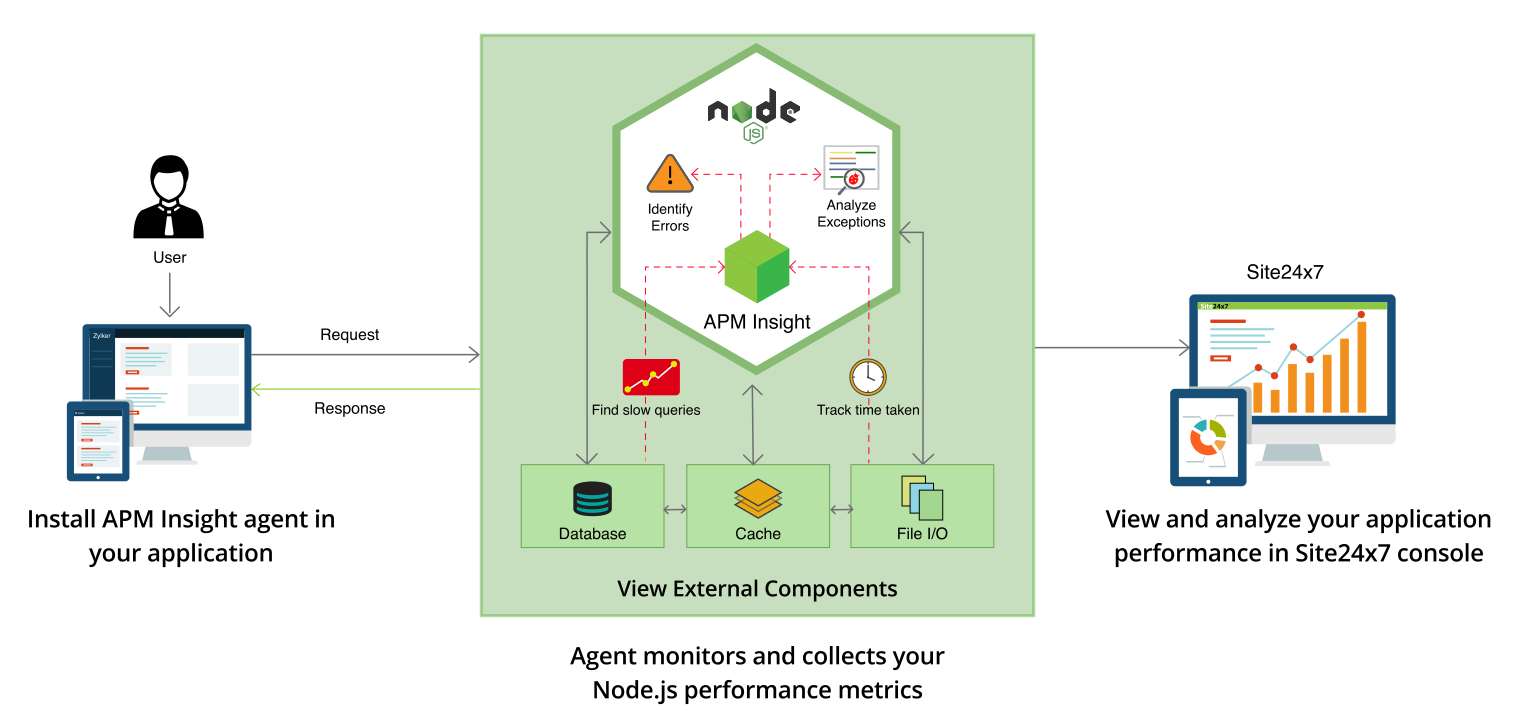
Implementing proper error handling in your Node.js code is essential—and monitoring those errors in production is equally important. Together, they create a complete error management lifecycle:
For Node.js applications, Site24x7 APM provides:
Start monitoring your Node.js application errors with Site24x7 APM today. The combination of solid code practices and comprehensive application monitoring provides the reliability and visibility your users expect.
Yes, the Site24x7 Node.js agent automatically captures uncaught exceptions and unhandled promise rejections, providing full stack traces to help you debug immediately.
Site24x7 supports distributed tracing, allowing you to visualize how an error propagates through your microservices architecture and pinpoint exactly where the failure occurred.
Site24x7 provides deep insights into Node.js memory usage, including heap memory profiling and garbage collection metrics, helping you identify leaks that lead to application crashes.
